

Currently Empty: ₹0.00



Uncategorized
Data Visualization: 7 Powerful Techniques That Make Your Insights Clear
Data visualization is the skill of turning raw numbers into pictures that people can understand in seconds. A spreadsheet with 5,000 rows hides its story, but one well-built chart can reveal it instantly. Whether you are a student, an analyst, or a beginner entering data science, learning data visualization is one of the most useful habits you can build early.
The information will take you through data visualization meaning and working process. It then walks through seven effective techniques, shows which tools suit each skill level, and ends with common mistakes and 10 FAQs. By the end, you will know how to pick the right chart for any dataset and how to present your findings with confidence.
Table of Contents
What Is Data Visualization?
Data visualization means representing information in a visual format such as a chart, graph, map, or dashboard. Its purpose is not decoration. It helps you see patterns, trends, and outliers that are almost impossible to notice in a table of numbers.
Imagine a small shop owner reviewing a year of sales. A table of 365 daily entries tells her very little. A line chart of the same data shows that sales jump every October and November because of festival season, and that they fall every February. She can then stock up in advance and plan her spending. The numbers did not change, but the way she looked at them did.
In data science, data visualization appears at every stage of a project. Analysts use it to explore a new dataset, to check data quality, to test ideas, and finally to present results to people who are not technical. That is why it is considered a core skill rather than an optional extra.
Why Data Visualization Matters
Four mains reasons for data visualization matter:
- Speed: the human brain processes images far faster than rows of text or numbers, so a chart delivers its message in seconds.
- Clarity: patterns, gaps, and exceptions stand out visually, which makes problems easier to catch early.
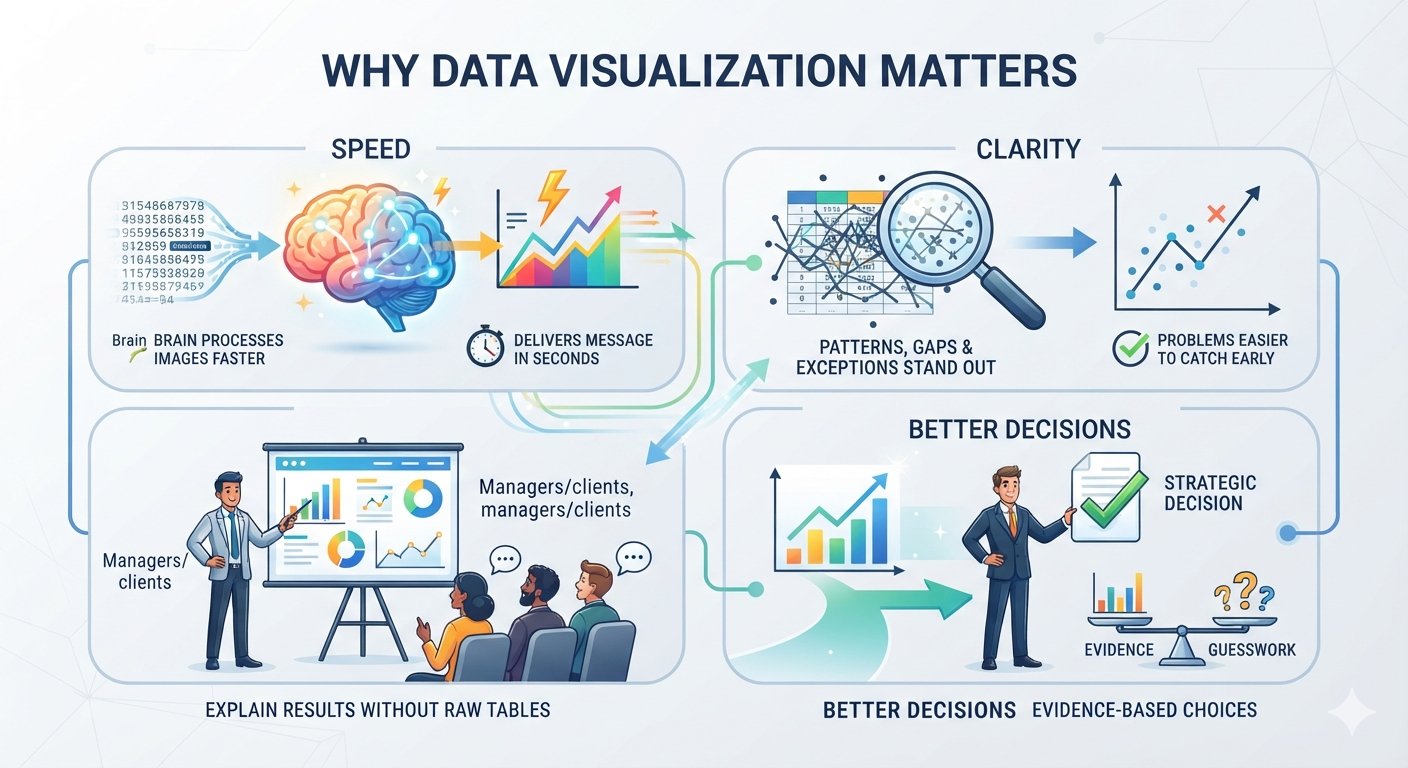
- Communication: you can explain results to managers, teachers, or clients without asking them to read raw tables.
- Better decisions: when insights are clear, decisions are based on evidence instead of guesswork.
Poor data visualization has the opposite effect. Misleading becomes from a confusing chart that can hide truth. That is why learning the right data visualization methods, and not just the software, is so important.
Technique 1: Bar Charts for Comparing Categories
Most common charts among various activities is bar charts. They compare values across categories such as products, cities, or departments. The length of each bar shows the size of the value, so the eye can compare quickly.
When to use them: comparing sales by product, students by branch, or website visits by country.
Tips for better bar charts:
- Always start the axis at zero, or the bars will exaggerate small differences.
- Sort the bars from highest to lowest unless the categories have a natural order, such as months.
- Use horizontal bars when category names are long.
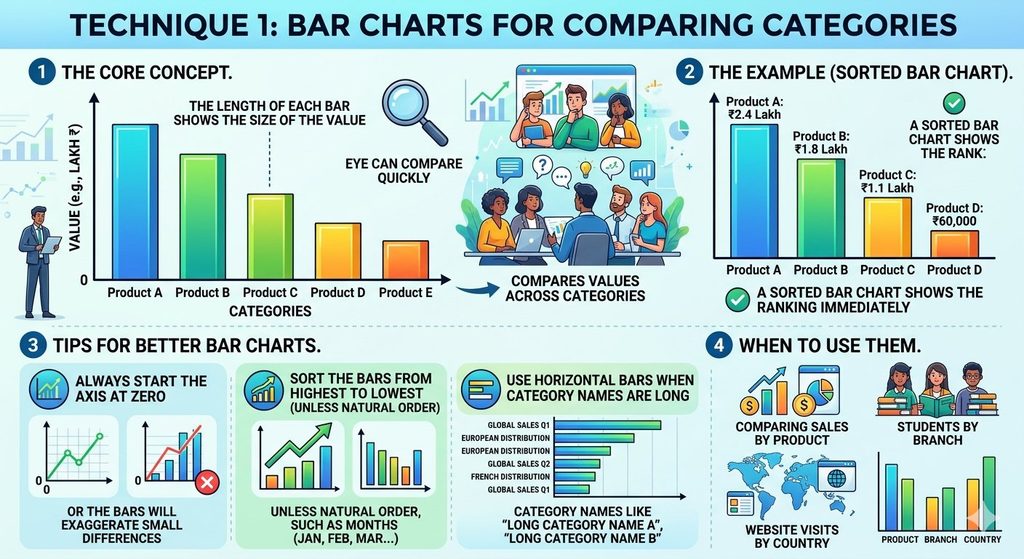
For example, if four products earned ₹2.4 lakh, ₹1.8 lakh, ₹1.1 lakh, and ₹60,000 in a month, a sorted bar chart shows the ranking immediately. Among all chart types, this is the easiest one to start with.
Technique 2: Line Charts for Showing Trends Over Time
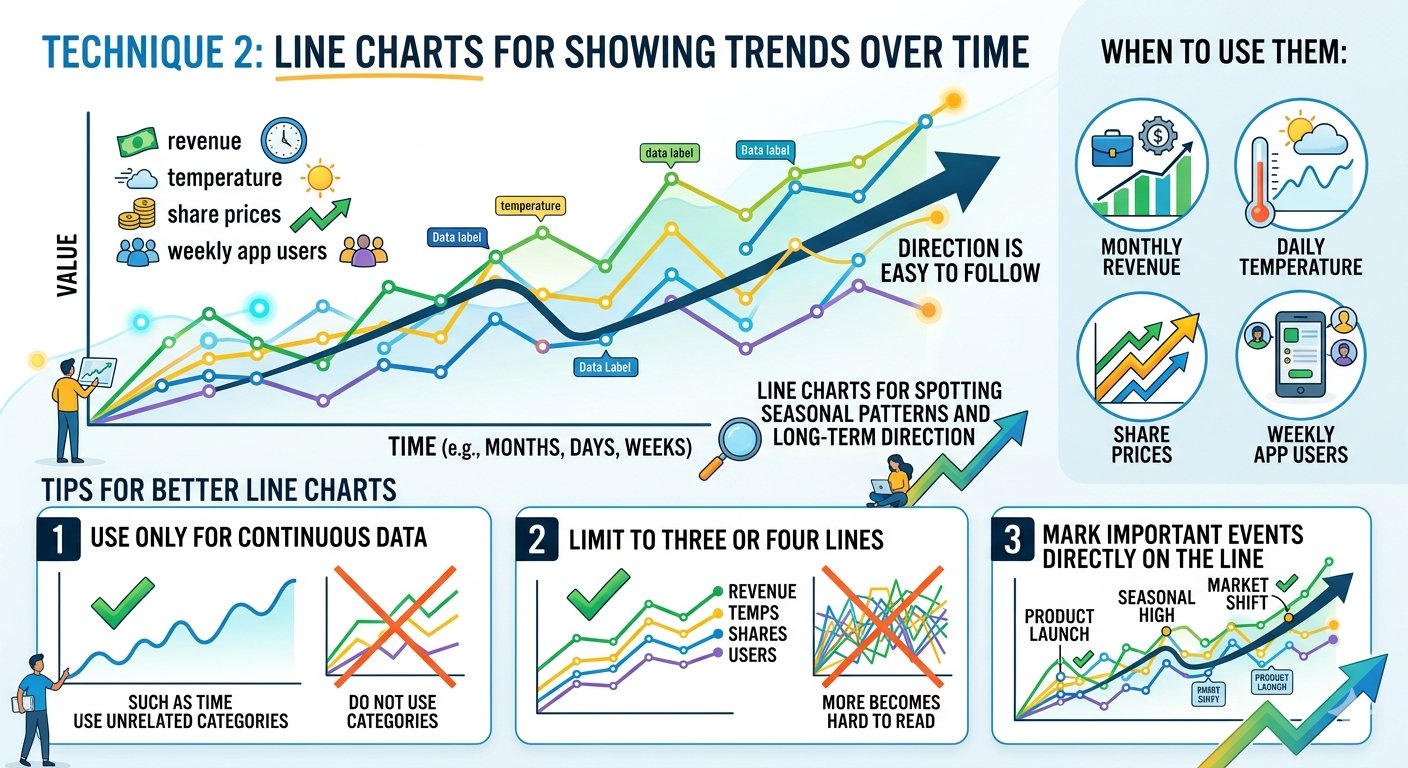
When you want to show how something changes over time, use a line chart. Time always runs along the horizontal axis, and the line connects each data point so the direction is easy to follow.
When to use them: monthly revenue, daily temperature, share prices, or weekly app users.
Tips for better line charts:
- Use a line chart only for continuous data such as time. Do not use it for unrelated categories.
- Limit yourself to three or four lines on one chart, because more becomes hard to read.
- Mark important events, such as a product launch, directly on the line.
Line charts are among the most reliable data visualization methods for spotting seasonal patterns and long-term direction. They show not just where a number is, but where it is heading.
Technique 3: Scatter Plots for Finding Relationships
A scatter plot places each data point on two axes, one variable on the horizontal axis and another on the vertical axis. It answers a different question from the first two charts: are these two things related?
When to use them: study hours against exam marks, advertising spend against sales, or house size against price.
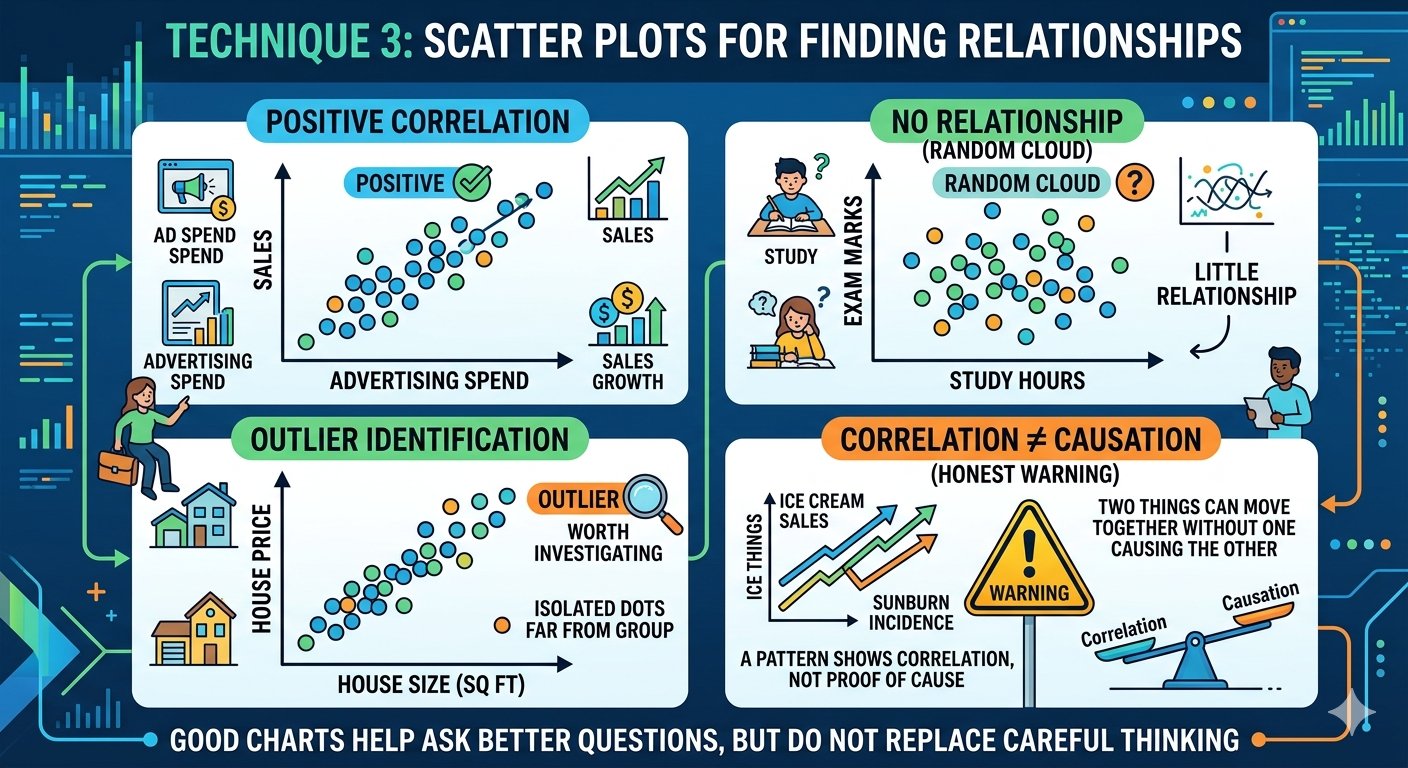
If the dots rise from bottom-left to top-right, the two variables tend to move together. If they form a random cloud, there is little relationship. Isolated dots far from the group are outliers worth investigating.
One honest warning: a pattern in a scatter plot shows correlation, not proof of cause. Two things can move together without one causing the other. Good charts help you ask better questions, but it does not replace careful thinking.
Technique 4: Histograms for Understanding Distribution
A histogram groups numbers into ranges, called bins, and shows how many values fall in each bin. It looks like a bar chart, but it describes the spread of one numerical variable rather than comparing categories.
When to use them: exam score distribution, customer age groups, or delivery times.
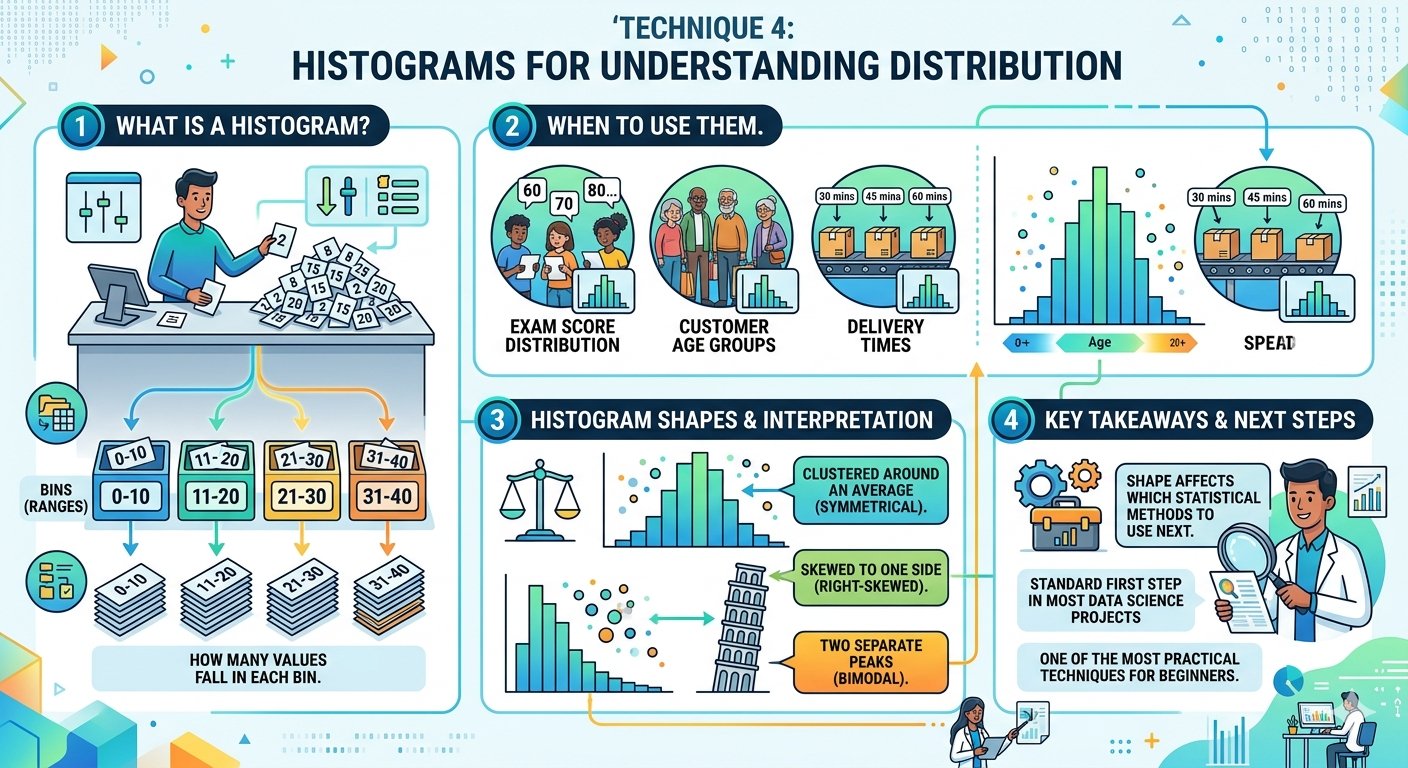
A histogram quickly tells you whether your data is clustered around an average, skewed to one side, or has two separate peaks. That shape affects which statistical methods you should use next. Because of this, histograms are a standard first step in most data science projects, and they are one of the most practical techniques for beginners to learn after bar and line charts.
Technique 5: Heatmaps for Spotting Patterns
A heatmap uses colour intensity to show values in a grid. Darker or warmer colours usually mean higher values, and lighter colours mean lower ones. This makes a large table readable at a glance.
When to use them:
- A correlation matrix showing how many variables relate to each other.
- Website traffic by day of the week and hour of the day.
- Attendance or sales across a calendar.
Heatmaps are particularly useful in machine learning, where analysts check which features are strongly related before building a model. Choose your colours carefully. A single-colour gradient, such as light blue to dark blue, is easier to read and more accessible than a rainbow scale. Many software packages create heatmaps with a single line of code or a few clicks.
Technique 6: Box Plots for Comparing Spread and Outliers
A box plot, also called a box-and-whisker plot, summarises a dataset using five numbers: the minimum, the first quartile, the median, the third quartile, and the maximum. The box shows where the middle half of your data sits, the line inside marks the median, and the whiskers show the range. Dots outside the whiskers are outliers.
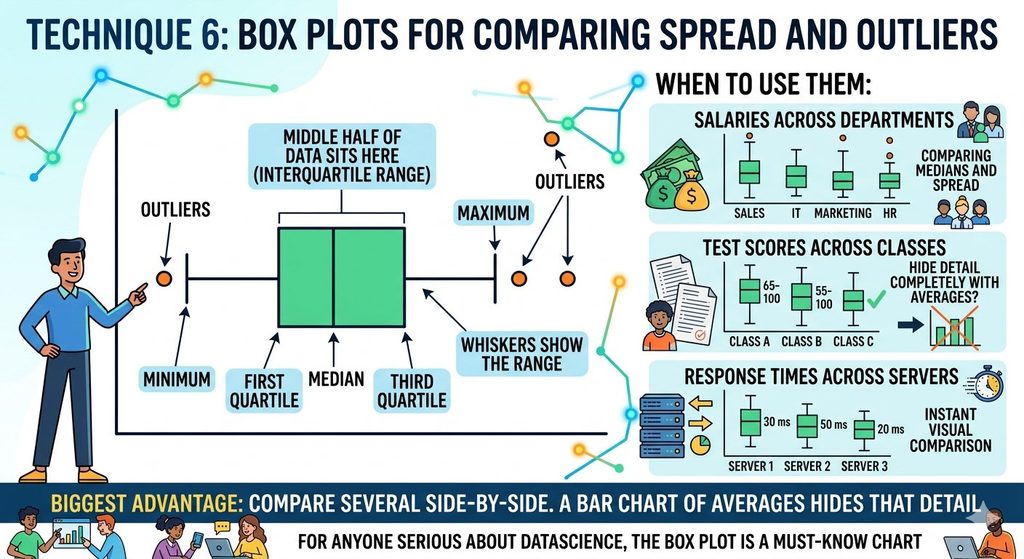
When to use them: comparing salaries across departments, test scores across classes, or response times across servers.
The biggest advantage is that you can place several box plots side by side and compare their medians and spread in a single image. A bar chart of averages would hide that detail completely. For anyone serious about data science, the box plot is a must-know chart.
Technique 7: Dashboards for Telling the Full Story
A dashboard combines several charts and key numbers on a single screen so that someone can monitor a situation at a glance. Instead of building one chart for one question, you design a complete view of the topic.
When to use them: tracking business performance, monitoring a project, or presenting results to a team.
Dashboard best practices:
- Put the most important number or chart at the top left, where people look first.
- Keep it to five or six visuals. A crowded dashboard confuses more than it explains.
- Use consistent colours, fonts, and chart styles throughout.
- Add filters, such as date or region, so viewers can explore on their own.
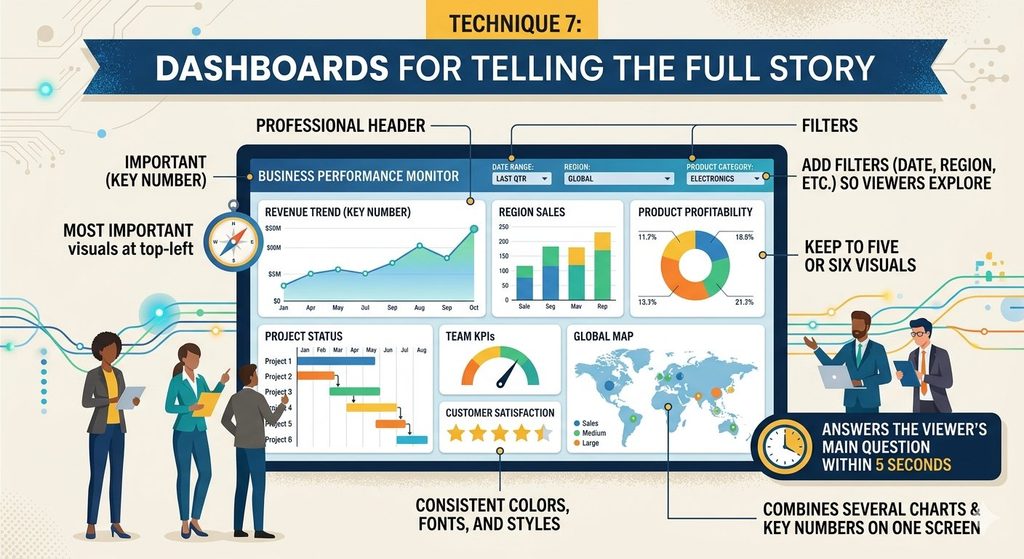
A good dashboard answers the viewer’s main question within five seconds. It brings every other technique in this list together into one useful view.
Best Data Visualization Tools and Software
Once you know the techniques, you need the right software to build them. Here are widely used data visualization tools for different skill levels:
- Microsoft Excel and Google Sheets: best for beginners and quick charts. Both are free or already installed on many computers.
- Tableau Public: a drag-and-drop tool for interactive charts and dashboards, with a free version.
- Power BI: strong for business reporting, especially if you already use Microsoft products.
- Python (Matplotlib, Seaborn, Plotly): best for data scientists who need full control and automation.
- Google Looker Studio: a free web tool that connects easily to Google Sheets and other Google data sources.
For students, a sensible path is to start with Excel or Google Sheets, then learn Python-based plotting libraries once you are comfortable with basic charts. You do not need to learn every tool. Pick one and build real projects with it, because practice teaches more than any tutorial.
How to Choose the Right Chart
Many beginners ask which chart is best, but the better question is: what do I want my audience to see? Use this quick guide:
- Comparing categories: bar chart.
- Showing change over time: line chart.
- Showing a relationship between two numbers: scatter plot.
- Showing how values are spread: histogram or box plot.
- Scanning a large grid of values: heatmap.
- Monitoring many measures together: dashboard.
Start with the question, choose the chart, and only then open your tool. This order keeps your data visualization focused and prevents you from building impressive-looking charts that say nothing.
Common Data Visualization Mistakes to Avoid
Even with the right technique, a few habits can make a chart misleading or confusing:
- Using pie charts for too many slices. Beyond four or five categories, a bar chart is clearer.
- Truncating the axis. Starting a bar chart at a number other than zero makes small differences look huge.
- Adding too many colours. Use colour to highlight, not to decorate.
- Skipping labels and titles. A chart without a title, axis labels, or units forces people to guess.
- Using 3D effects. They distort proportions and add nothing useful.
The rule of thumb is simple: if a chart needs a long explanation, redesign it. A clear chart should explain itself.
Conclusion
Data visualization is more than making charts look good. It is how analysts and scientists turn numbers into decisions. Use bar charts to compare, line charts to show trends, scatter plots to find relationships, histograms to see distribution, heatmaps to scan large tables, box plots to compare spread, and dashboards to tell the whole story.
Start small. Take one dataset, try three of these data visualization techniques, and see which one explains your data best. With regular practice, choosing the right chart will become second nature, and your insights will be clear to anyone who sees them.
Frequently Asked Questions (FAQs)
1. What is data visualization in simple words?
Data visualization means showing data as charts, graphs, or maps so that patterns and insights are easy to understand. It replaces long tables of numbers with pictures that people can read quickly.
2. Why is data visualization important in data science?
It helps data scientists explore data, find patterns and outliers, and explain results to people without a technical background. Without data visualization, even a strong analysis can be hard to communicate.
3. What are the most common data visualization charts?
The most common data visualization charts are bar charts, line charts, pie charts, scatter plots, histograms, heatmaps, and box plots. Each one suits a different kind of question, such as comparison, trend, relationship, or distribution.
4. Which data visualization technique is best for beginners?
Bar charts and line charts are the best starting point. They are easy to build, easy to read, and cover most basic needs, such as comparing categories and showing change over time.
5. What are the best data visualization tools for students?
Excel and Google Sheets are the easiest to begin with, and Tableau Public and Google Looker Studio are free and beginner-friendly. Once you are comfortable, Python libraries such as Matplotlib and Seaborn give you more control.
6. Do I need coding skills to learn data visualization?
No. Data visualization software such as Excel, Tableau, and Power BI lets you create professional charts without writing code. Coding becomes useful when you want to automate reports or work with large datasets.
7. What is the difference between data visualization methods and tools?
Methods are the techniques or chart types you choose, such as a heatmap or a scatter plot. Tools are the software you use to build them, such as Tableau or Python. You choose the method first and the tool second.
8. How do I choose the right chart for my data?
Start with your question. Use a bar chart to compare categories, a line chart for change over time, a scatter plot for relationships, a histogram for distribution, and a heatmap for large grids of values.
9. What are the biggest data visualization mistakes?
Common mistakes include using too many pie slices, starting a bar chart axis above zero, using too many colours, leaving out labels and titles, and adding unnecessary 3D effects.
10. Is data visualization a good career skill?
Yes. Data analysts, data scientists, business analysts, and marketers all use it daily. It is not a complete career on its own for most people, but it strengthens almost every data-related role.